
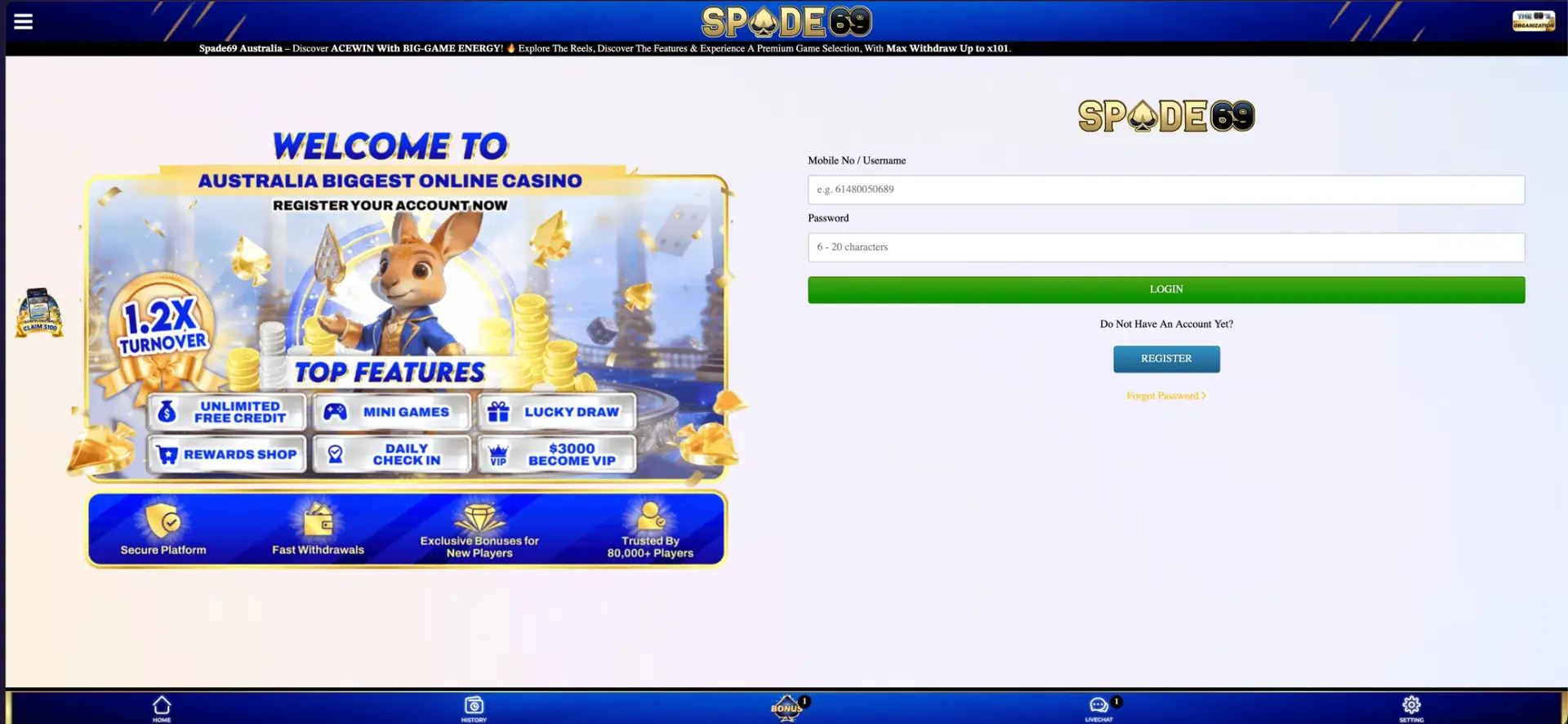
Spade69 login takes two fields: the mobile number or username registered on the account, with the number in international format starting with 61 (for example 61480050689), and a password of 6 to 20 characters. The yellow Login button sits at the top of the right-hand panel on every page. Under the form there is a Forgot Password link and a Register button for visitors without an account. The same details work in desktop and mobile browsers and in the Android APK. After signing in, the panel shows the AUD balance with Deposit, Withdraw and Refresh buttons.
This page covers the sign-in steps, the format each field expects, how to get back into a locked or forgotten account, and the separate User ID login used by the Lucky Spin mini game. It also covers the errors Australian players run into most often and what becomes available once the session is open.
| Login essentials | Details |
|---|---|
| Where to log in | Login button in the right-hand panel or on the welcome screen |
| Login ID | Mobile number (61… format) or username |
| Password | 6-20 characters |
| Account verification | Mobile number confirmed by SMS code at registration |
| Password reset | Forgot Password link under the login form |
| Mini game login | User ID from the account profile |
| Devices | Desktop browser, mobile browser, Android APK |
| Currency after login | AUD |
| Help | Livechat in the bottom menu |
How to log in to Spade69
Signing in takes a few seconds once the details are at hand. The order of steps is the same on a computer and on a phone.
- Open the official Spade69 site and check that the "Spade69 Australia" ticker runs across the top.
- Tap the yellow Login button in the right-hand panel.
- In Mobile No / Username, enter your number starting with 61, without the leading 0 and without spaces, or enter your username.
- Enter your password, paying attention to upper and lower case.
- Tap the green Login button.
- Check that the balance panel now shows your AUD balance instead of AUD 0.00 with Login and Register buttons.
Login fields explained
Most failed sign-ins on Spade69 come from the phone number format, not from a wrong password. The table shows what each field expects.
| Field | Expected format | Example |
|---|---|---|
| Mobile No / Username | Country code 61 followed by the number without its leading 0, or the account username | 61480050689 |
| Password | 6-20 characters, case-sensitive | Chosen at registration |
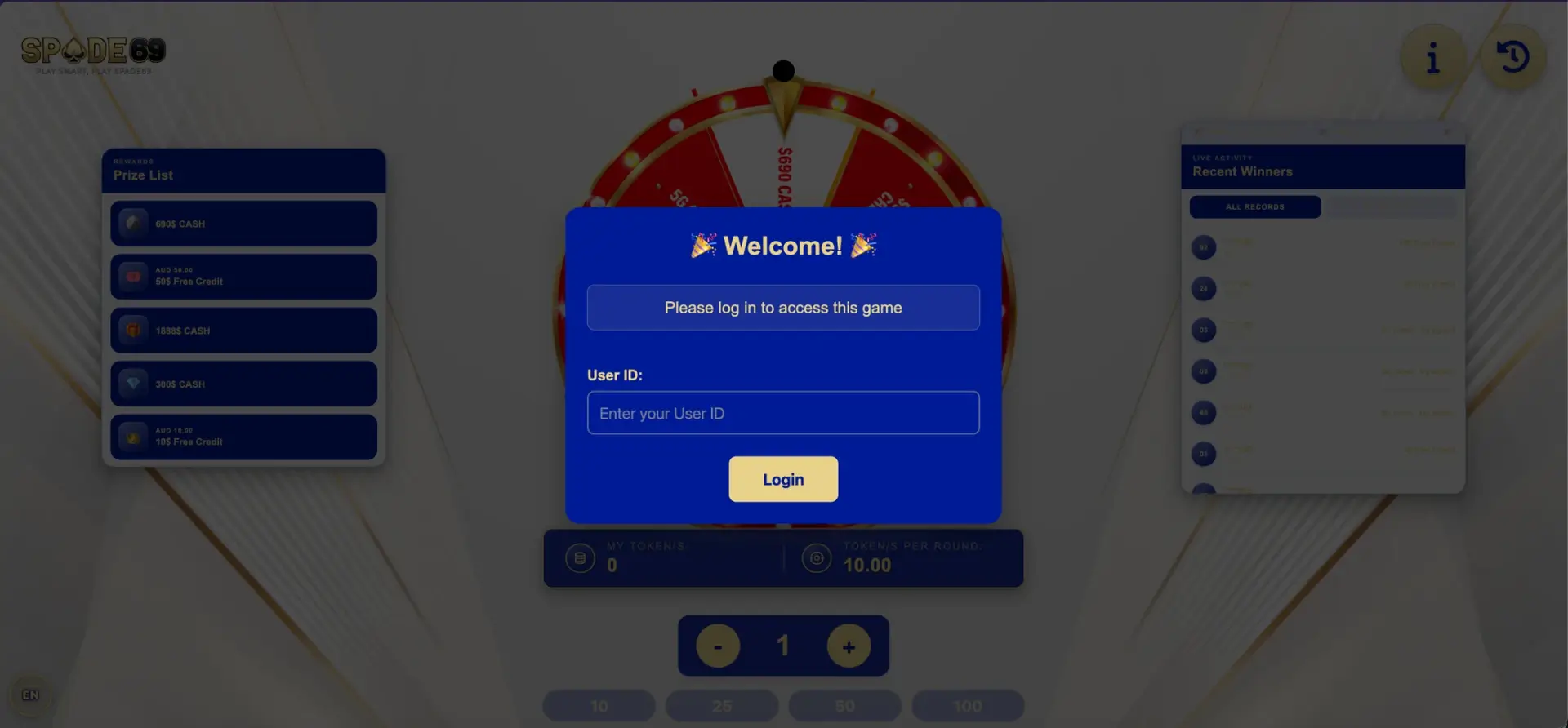
| User ID (Lucky Spin only) | Account identifier shown in the profile | Shown under Setting |
An Australian mobile written locally as 0480 050 689 becomes 61480050689 in the login field: drop the 0, add 61 and remove the spaces. Entering the local format is the single most common reason for an "account not found" type error.
Create an account if you do not have one
The Spade69 login screen has a Register button under the question "Do Not Have An Account Yet?". Registration uses the same phone number that later serves as the login, so it is worth entering it carefully.
- Enter your full name exactly as it appears on your bank account.
- Enter your mobile number in 61… format.
- Choose a 6-20 character password.
- Leave the Referrer Code as filled in, or empty if you came directly.
- Tap Get Code, enter the SMS verification code and tap Register.
Once registered, the account opens in AUD and can claim the New Member Bonus of AUD 28 and the Checkmate Free Credit of AUD 50 from the Bonus page.
Forgot your Spade69 password?
Access is restored from the Forgot Password link directly under the login form. Because every Spade69 account is registered with an SMS-verified mobile number, that number is the key to recovery, so keep it active and with you.
- Tap Forgot Password under the Login button.
- Enter the mobile number used at registration.
- Follow the on-screen prompts to confirm ownership of the number.
- Set a new 6-20 character password that you have not used elsewhere.
- Log in again with the new password.
If the registered number is no longer in use, password recovery through the site will not work. In that case, open Livechat from the bottom menu and be ready to confirm the account name, which matches your bank account name.
Lucky Spin: logging in with your User ID
The Lucky Spin prize wheel in the Mini Games section opens as a separate screen with its own "Welcome! Please log in to access this game" window. Instead of the phone number, it asks for a User ID. The ID appears in the account profile under Setting. Once logged in, the wheel shows the token balance, the cost of 10 tokens per round and options to play 1, 10, 25, 50 or 100 rounds. Prizes include AUD 10 and AUD 50 free credit and larger cash prizes.
What you can access after logging in
Signing in unlocks the parts of Spade69 that are closed to guests. Most of them are in the fixed bottom menu, so they are one tap away on any page.
- Balance panel: AUD balance with Deposit, Withdraw and Refresh.
- Bonus: the grid of claimable tiles, where available offers are bright and unavailable ones are dimmed.
- History: deposits, withdrawals, bets and bonus claims.
- Livechat: support, with a counter for unread replies.
- Setting: profile, User ID and password.
- Daily Check-In: the banner in the right-hand panel, which rewards logging in every day.
- Ambassador Program: referral link, Copy Link and Downline overview.
Troubleshooting common Spade69 login errors
Most sign-in problems fall into a handful of patterns. The fixes below cover the ones that come up most often in a browser and in the APK.
Wrong number format or password
Check that the number starts with 61 and has no leading 0 or spaces, then retype the password with caps lock off. If the password manager filled in an old password, clear the field and type it manually.
Page loads but the login button does nothing
Clear the browser cache and cookies for the site, turn off script-blocking extensions and reload. Trying a different browser, such as Chrome or Safari, usually rules out a local problem within a minute.
SMS code does not arrive
This affects registration and recovery. Wait a minute before tapping Get Code again, check the phone has signal, and make sure the number was entered in 61… format. Messages from short codes are sometimes filtered as spam on Android phones.
Account temporarily blocked
Several failed attempts in a row, or a login from an unfamiliar device or location, can trigger the iovation and ThreatMetrix fraud checks used by Spade69. Contact Livechat rather than repeating attempts, which can extend the lock.
Secure login practices
A Spade69 account holds real money in AUD and is linked to a bank account in your name, so it deserves the same care as online banking. A few habits cover most risks.
- Use a password that is unique to Spade69 and close to the 20-character limit.
- Reach the site only through a bookmark or the link in the official Telegram or Facebook channels, never through unknown ads.
- Never share your password or SMS codes. Support does not need them.
- Log out on shared computers and do not let the browser save the password there.
- Install the Android APK only from the App Download tab on the official site.
Spade69 login FAQ
Short answers to the questions players ask most often about signing in to Spade69.
What do I use to log in to Spade69?
Your mobile number in 61… format or your username, plus the 6-20 character password set at registration.
Why does Spade69 say my account is not found?
Usually because the number was entered as 04… instead of 614…. Remove the leading 0, add 61 and remove spaces.
How do I reset my Spade69 password?
Tap Forgot Password under the login form and follow the steps using the mobile number registered on the account.
Is the login the same in the app and in the browser?
Yes. The same number or username and password work in desktop and mobile browsers and in the Android APK.
What is the User ID for?
It is used to sign in to the Lucky Spin mini game. You can find it in the account profile under Setting.
Can I log in to Spade69 from Australia?
Spade69 is built for Australian players and runs in AUD, but it is licensed overseas. Check the legal position in your state or territory before playing.

Independent research for Australian readers. We do not operate the casino or manage player accounts and payments.